Why Was I Liquidated Before My Stop Loss?
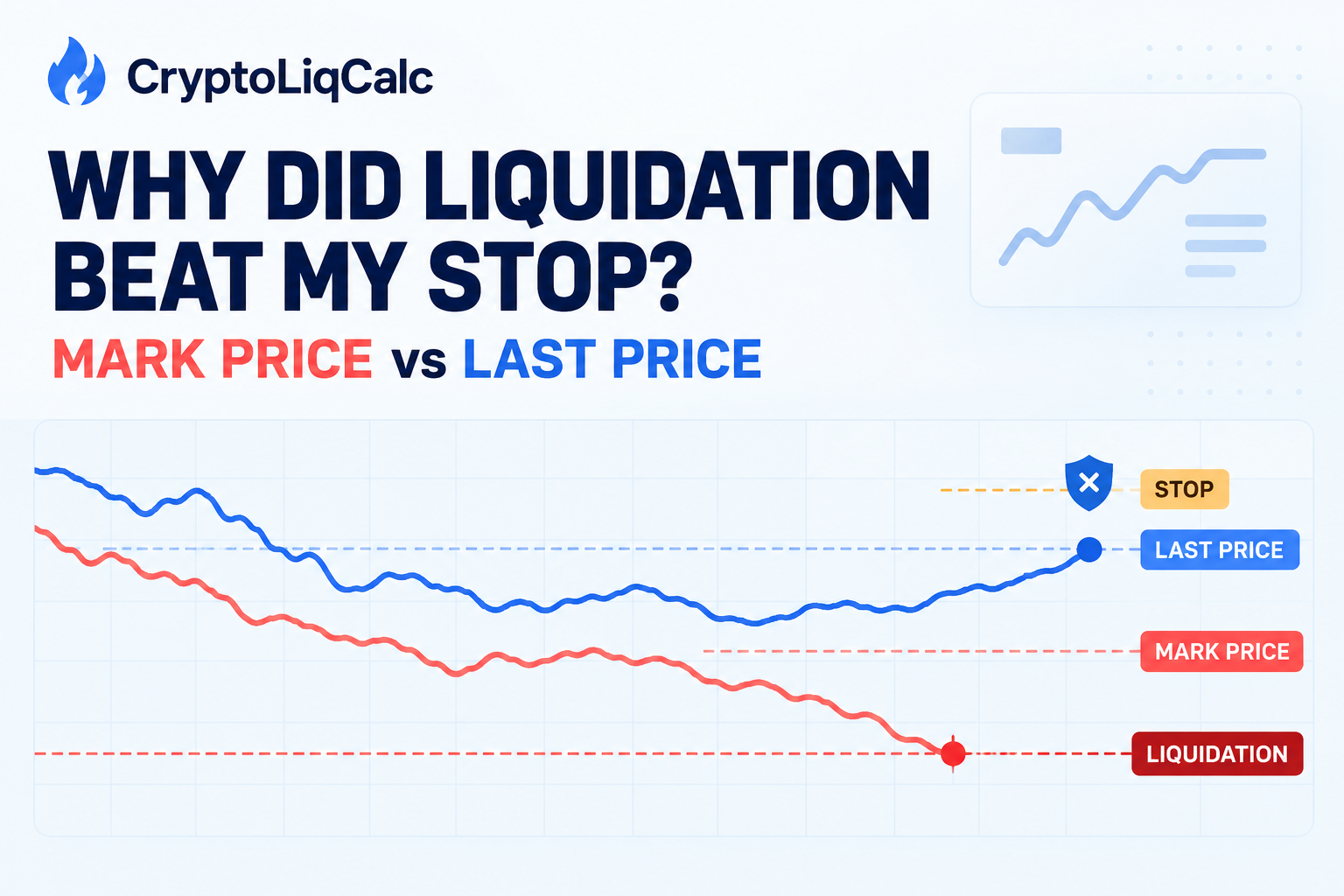
You placed a stop above your liquidation price. The chart never appeared to touch the liquidation line. Yet the position was liquidated before the stop closed it. That sequence feels impossible until you notice that the stop and the liquidation engine may have been watching different prices.
- Perpetual futures exchanges commonly use mark price to trigger liquidation.
- Your stop may watch last price unless you choose another trigger.
- A triggered stop still needs to fill. Speed, liquidity and order type matter.
- Align the trigger with liquidation logic and leave a meaningful price buffer.
The short answer
Liquidation and stop-loss orders are separate systems. On many perpetual futures venues, liquidation is based on the position’s mark price. A stop order can instead be configured to watch the last traded price.
Those prices are usually close, but they are not identical. During a sharp move, a temporary gap can open between them. If mark price reaches your liquidation threshold while last price has not reached the stop trigger, the liquidation engine acts first.
Bybit documents this exact scenario. Binance states that mark price is used for liquidation and unrealized PnL, while its protective orders can use mark price or last price as the trigger. OKX also separates mark price from last price in its derivatives documentation.
The three prices on a perpetual contract
Last price
Last price is the price of the most recent trade on that exchange’s contract. It drives the candle you normally see and can jump when a market order consumes several levels of the order book.
Index price
Index price is a reference built from spot-market prices. Each exchange has its own basket and safeguards. It aims to represent the broader market instead of one derivative venue’s latest trade.
Mark price
Mark price is a calculated fair-price reference derived from the index and a basis or funding component. Binance describes a price index plus funding-related basis. OKX describes its mark price as the spot index plus a moving-average basis.
This design helps reduce liquidations caused by a brief, isolated contract-price spike. It does not mean mark price is always slower or more favorable than last price. Either line can lead for a short period.
| Price | Meaning | Common use |
|---|---|---|
| Last | Most recent contract trade | Chart and optional triggers |
| Index | Reference from spot markets | Fair-price input |
| Mark | Calculated fair price | Liquidation and unrealized PnL |
Four ways liquidation can beat your stop
1. The stop watches a different trigger
Suppose a long liquidates at a mark price of $62,850. Its stop is $63,000 but watches last price. Mark falls to $62,850 while the last trade is still $63,040. The liquidation condition is true; the stop condition is not.
2. The stop sits too close to liquidation
A $150 gap sounds useful, but on a $65,000 asset it is about 0.23%. Basis movement, spread and execution slippage can consume that space quickly. Judge the buffer as a percentage and against the asset’s volatility, not only as a dollar amount.
3. The stop triggers but does not fill in time
A stop-market order becomes a market order after its trigger is reached. In a fast decline, it can fill below the trigger. A stop-limit controls the acceptable price but brings another risk: the market can pass through the limit without filling it.
4. The liquidation price moved
The estimate shown when you opened the trade is not always permanent. Funding can reduce margin. A larger position can enter a different maintenance-margin tier. In cross margin, wallet balance and other positions can shift the threshold.
Default candles often display last price. They may never touch the liquidation line even though mark price did. Open the platform’s mark-price chart and compare the precise event timestamps before drawing a conclusion.
A safer stop-loss setup
Calculate the liquidation price with the correct exchange, direction, margin mode, leverage and maintenance-margin assumptions. Then compare it with the live estimate on the exchange.
- Choose the trigger deliberately. A mark-price trigger usually aligns a protective stop more closely with mark-price liquidation. Confirm the setting on your venue.
- Leave execution room. The gap must absorb basis changes and slippage. There is no universal safe percentage; volatility, liquidity and size matter.
- Size from the stop. Choose the stop from your trade thesis and calculate position size from the amount of equity you can lose.
- Understand the order type. Stop-market prioritizes exiting. Stop-limit prioritizes a price constraint and may not fill.
- Recheck after changes. Funding, added margin, partial closes and other cross-margin positions can alter the estimate.
If a sensible technical stop sits uncomfortably close to liquidation, the position is probably too large for its leverage and margin. Reducing size creates genuine room.
Choose your exchange and margin mode. Calculations run locally.
Open Liquidation Calculator →What to record if this happens
Save the position history, liquidation record and stop-order history. Note the stop’s trigger type, order type and timestamp. Capture both the last-price and mark-price charts around the event.
That evidence separates a trigger mismatch from an execution problem. It also gives the exchange’s support team something specific to investigate if the records still do not reconcile.